
You bought one of the AI search monitoring tools, loaded 200 prompts, and a month later you have a share-of-voice chart and no idea what to change. The tool isn't the problem. The setup is: prompts your buyers don't ask, engines they don't use, and numbers nobody acts on. Here is a setup that ends in a to-do list.
If you only read this
- Track 30 to 50 prompts taken from real buyer questions, not hundreds you invented.
- Pick the engines and countries your buyers use. Run weekly, review monthly.
- Watch five numbers: mention rate, citation rate, answer position, cited sources, competitor share.
- Each month, turn the cited sources into a list of pages to improve and sites to be named on.
Below: the tools in one table, a five-step setup, and one open question: why the sources AI answers cite matter more than your own mention count.
How we wrote this. Spreadator is a growth marketing agency, and we run AI visibility checks as a service, so we care how these tools measure. We don't sell any of the tools below and this post has no affiliate links. Every tool named here comes from Google's page 1 or its AI Overview for "ai search monitoring tools" in the US on 11 Nov 2026, and each one was checked on its own website that day; plans change often, so we describe them in words; check each tool's own site for its current plans.
What AI search monitoring is, and the tools at a glance
AI search monitoring means asking AI engines a fixed set of questions on a schedule and recording who they name and which pages they cite. It is the measuring part of AI search optimization, the work of getting a business found and cited when people search with AI. Generative engine optimization (GEO) is the part that aims to get you cited inside written answers; our guide to GEO explains it and its sister term, AEO.
Most AI monitoring tools do the same basic job. They differ in which engines they cover, how often they run prompts, and what they let you do with the results. Here are the four kinds, with examples from the 11 Nov 2026 search results:
| Kind of tool | Examples | What stands out (from each tool's own site, 11 Nov 2026) |
|---|---|---|
| Free grader | HubSpot AI Search Grader | A free, one-time check of ChatGPT, Perplexity and Gemini, with no account needed |
| SEO-suite add-on | Semrush AI Visibility Toolkit, Surfer AI Tracker | Semrush: a paid subscription with daily prompt tracking. Surfer: a Sources tab listing every domain and URL the answers cite |
| Dedicated tracker | Profound, Peec AI, Otterly.AI | Peec AI and Otterly.AI both filter results by country; Profound adds citation analytics and sentiment |
| Agency tool | Rankability | Read-only client reports shared by link; cited sources export to CSV |
For the full comparison, by job and engine, see AI visibility tools: which one for which job. This post is about what comes after you pick one: the setup. If you'd rather have it set up and reviewed for you, that's part of our AI search optimization work.
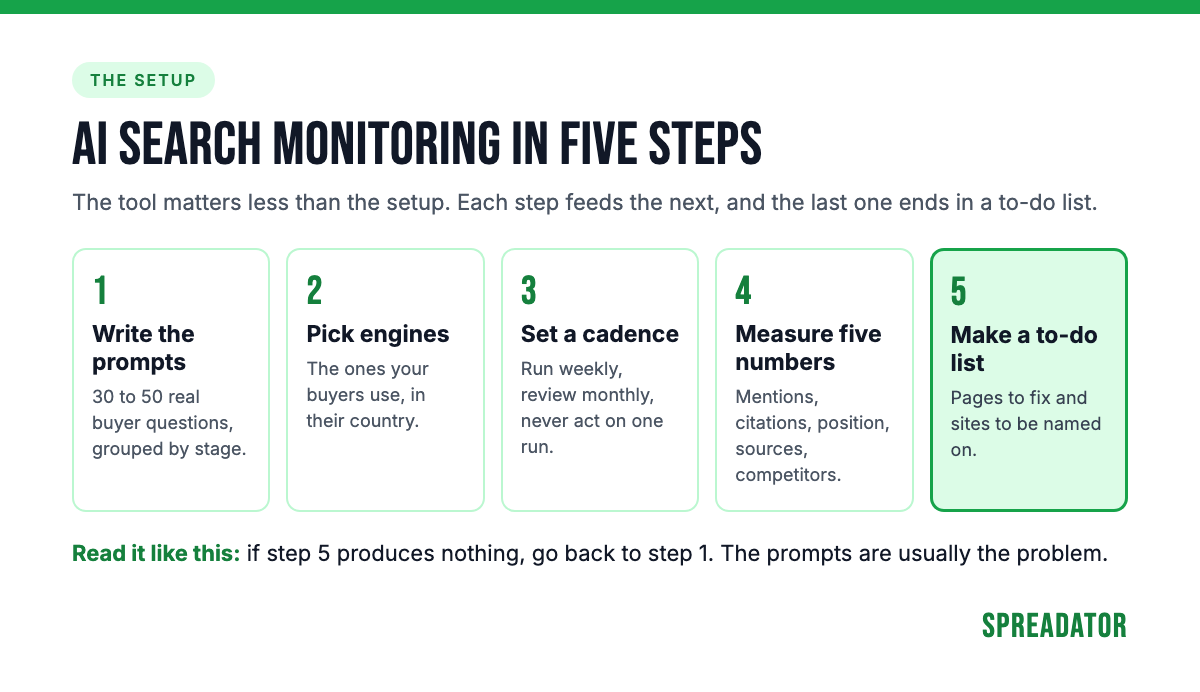
Step 1: write the prompts your buyers actually ask
Your prompt list decides everything the tool reports, so build it from what buyers say, not what you'd like to rank for. Five places hold their real words:
- Sales-call notes: the questions prospects ask before they buy.
- Search Console queries: longer queries, especially questions, already bring people to your site.
- People also ask: the questions Google shows under your main searches.
- Support tickets: what customers needed to know after buying.
- Reddit and forum threads: how buyers describe the problem to each other.
Group the prompts by buying stage: the problem, the options, the vendor, the price. A tool that reports one share-of-voice number across all four hides where you are missing.
Take a fictional HR software company selling to firms of 20 to 200 people. Its first prompt set might look like this:
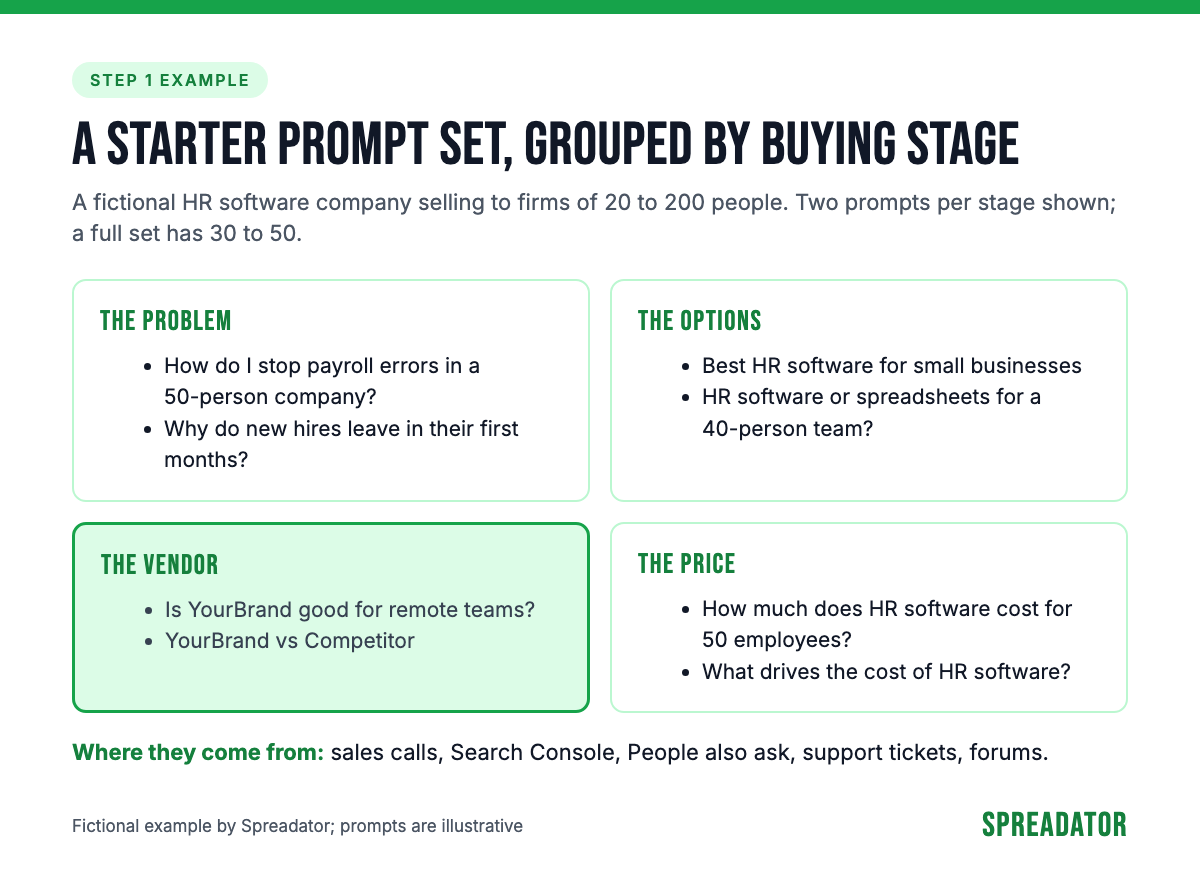
We suggest 30 to 50 prompts to start. That is our judgement, not a rule: enough to cover each stage, few enough that someone reads the answers. Add prompts when sales hears a new question. Remove the ones nobody asks.
Step 2: choose the engines and countries your buyers use
Track the engines your buyers use, in the country and language they search in. For most US businesses that means ChatGPT, Google's AI Overviews and AI Mode, Perplexity, Gemini and Copilot. Add Claude if your buyers work in it.
Set the country on purpose. Answers change with location, and several tools let you choose it: Peec AI and Otterly.AI both filter results by country (their own sites, 11 Nov 2026). A UK buyer and a US buyer asking the same question can see different brands.
Check the plan, not the feature page. Surfer's site says its Standard plan tracks ChatGPT only; its other plans add Gemini, Perplexity and Google's AI features. If your buyers use an engine your plan skips, you are measuring the wrong place.
Step 3: run weekly, review monthly, never act on one run
AI answers change from one run to the next, so a single check is a sample, not a result. A 2026 study by SparkToro and Gumshoe ran the same brand-recommendation prompts through ChatGPT, Claude and Google's AI results 60 to 100 times each. ChatGPT and Google's AI returned the same list of brands less than 1% of the time, and the same list in the same order less than 0.1% of the time (SparkToro, 2026, as reported by Search Engine Journal on 30 Jan 2026). Gumshoe sells AI tracking, which the study discloses.
That changes how you read the data:
- Run often. Weekly at least. Some tools run every day: Peec AI runs each prompt once every 24 hours, and Semrush tracks prompts day by day (their own sites, 11 Nov 2026).
- Read the trend monthly. One month of runs shows a direction; one day shows noise.
- Never act on one answer. A screenshot of a good answer proves as little as a screenshot of a bad one.
Step 4: measure five numbers and the visits they send
Five numbers cover what matters, and each one answers a different question.
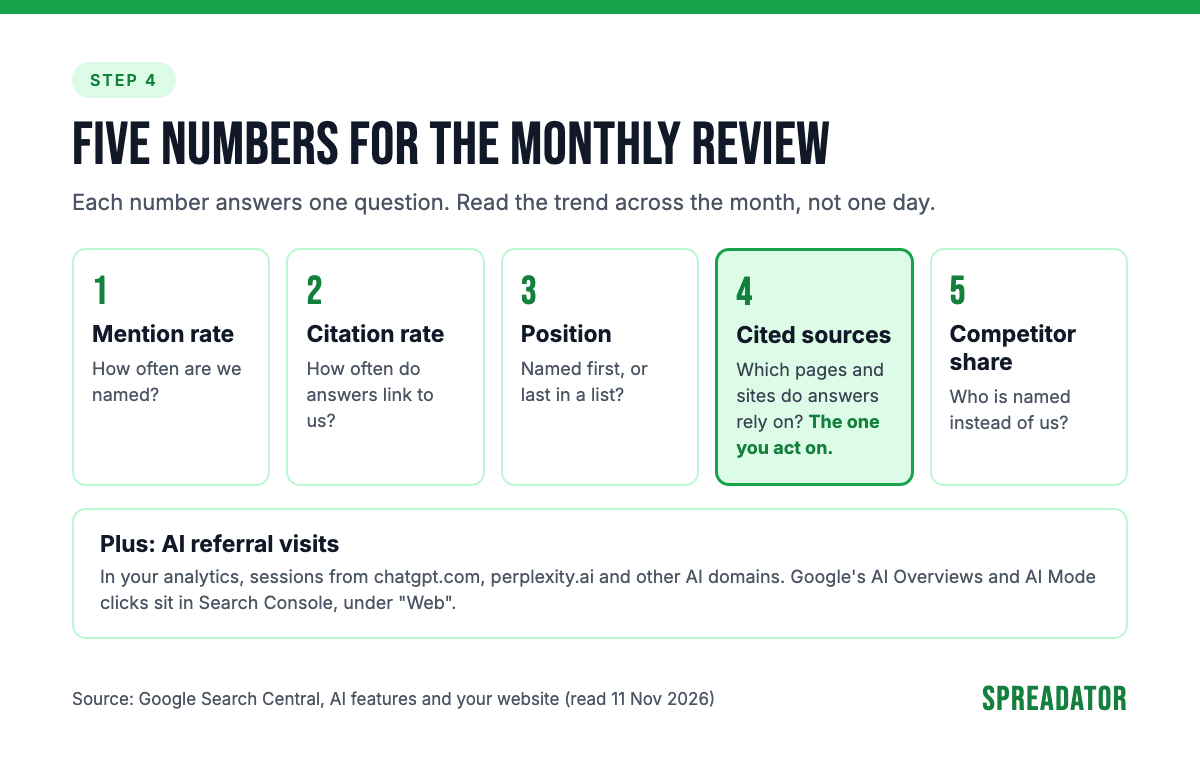
- Mention rate: the part of your prompts where an answer names you.
- Citation rate: the part where an answer links to one of your pages.
- Position: whether you are the first brand named or the last in a long list.
- Cited sources: which URLs and domains the answers link to, yours and everyone else's.
- Competitor share: your mentions against a fixed set of competitors on the same prompts.
Then check what reaches your site. In Google Analytics, filter sessions by source for AI domains such as chatgpt.com and perplexity.ai. Google's AI Overviews and AI Mode are different: Google says clicks from them are counted in Search Console's Performance report, under the "Web" search type (Google Search Central), so they sit inside your normal Google numbers. Our AI analytics work sets up these reports.
Step 5: turn the cited sources into a to-do list
Here is the open question from the top: why do cited sources matter more than your mention count? Because they are the part you can act on. A mention rate tells you where you stand. The list of cited sources tells you which pages and sites the engines trust for your topic, and that is a list of places to work on.
Each month, sort what you see into three cases:
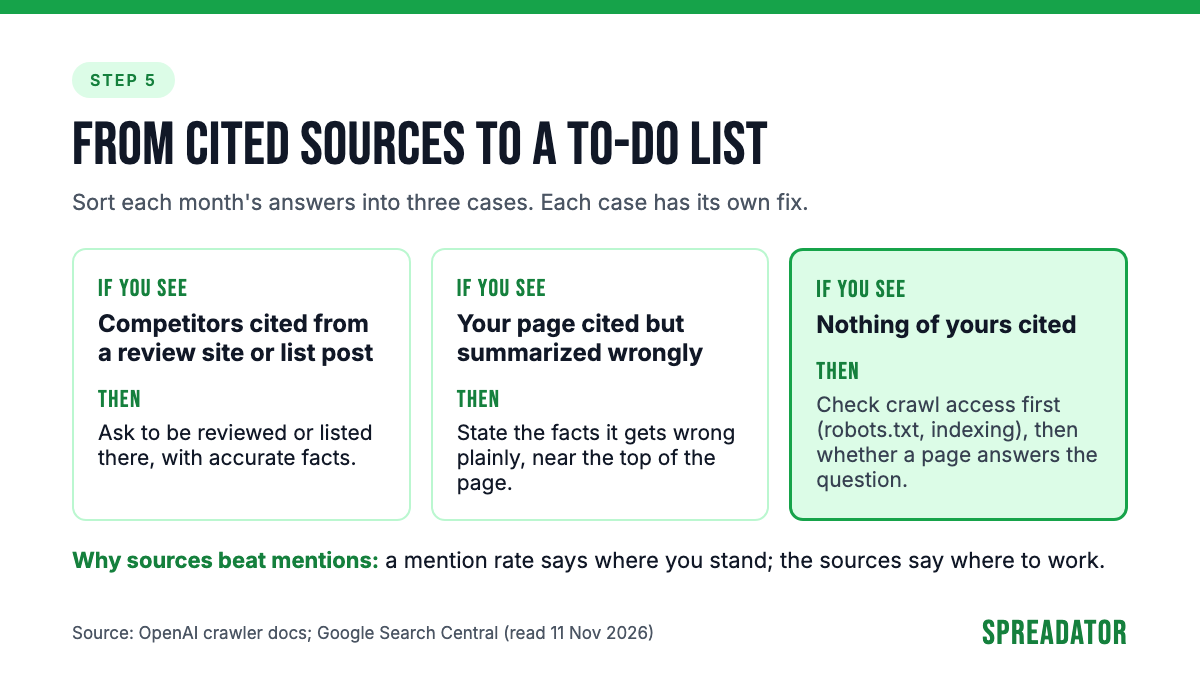
- Competitors are cited from a review site or a list post. That page shapes the answer. Ask to be reviewed or listed there, with accurate facts.
- Your page is cited but summarized wrongly. The engine found you and misread you. Rewrite the page so the facts it gets wrong are stated plainly, near the top.
- Nothing of yours is cited. First check crawl access. OpenAI says sites that block its search crawler, OAI-SearchBot, in robots.txt "will not be shown in ChatGPT search answers", apart from plain navigational links. Google says a page needs to be indexed and eligible for a snippet to appear in its AI features. If access is fine, the gap is content: you have no page that answers the question.
Most of these fixes are ordinary SEO work: clear pages, accurate facts, and mentions on the sites your buyers read.
Our take
Most teams track too many prompts and act on too few. Thirty prompts reviewed every month beat 500 that nobody reads. The tool's value is the to-do list it produces, not the dashboard.
Give the tracking to the person who owns the website. If the findings land with someone who can't change pages or pitch review sites, nothing changes. The best setup we know is boring: one owner, one monthly review, one list of changes, and the next month's numbers to see whether they worked.
Don't switch tools to get better numbers. Two tools ask from different places, with different settings and run counts, so they will disagree. Compare a tool with itself over time.
Setting up AI search monitoring tools for your brand
Start with a baseline before you build the full setup. Run your first 30 prompts across the engines your buyers use, and write down who is named, who is cited and from which pages. That baseline is your first AI visibility audit, and every month after is measured against it.
If you'd like a second pair of hands for that first step, ask us for an AI visibility check. We build the first prompt set with you, record where your brand appears, or doesn't, in ChatGPT, Gemini, Perplexity and Google's AI results for your main searches, and hand over what to track and what to fix first, whichever tool you use. Ask us for an AI visibility check.
FAQ
What are AI search monitoring tools?
They are tools that send a fixed list of prompts to AI engines such as ChatGPT, Gemini, Perplexity and Google's AI features on a schedule, save the answers, and report which brands are named and which pages are cited. The best AI search monitoring tools for you are the ones that cover your buyers' engines and countries; our comparison of AI visibility tools sorts them by job.
How many prompts should I track?
We suggest 30 to 50 to start, taken from sales calls, Search Console queries, People also ask and support tickets, grouped by buying stage. That is our judgement, not a rule. Add prompts when you hear new buyer questions and drop the ones nobody asks.
How often should I check AI visibility?
Run your prompts at least weekly and read the trend monthly. AI answers vary from run to run: a 2026 SparkToro study found the same brand list came back less than 1% of the time across repeated runs. Never act on a single answer.
Can I track ChatGPT traffic in Google Analytics?
Yes. Filter sessions by source for chatgpt.com, and do the same for other AI domains such as perplexity.ai. Clicks from Google's AI Overviews and AI Mode are counted in Search Console's Performance report under the "Web" search type, together with your other Google results.
Is HubSpot's AI Search Grader enough?
For a one-off check, often yes. The HubSpot AI Search Grader is a free, one-time check of what ChatGPT, Perplexity and Gemini say about your brand, with no account needed. It won't track your own prompts, competitors or trends over months; for that you need a tracking tool.